
When your car won’t start, it can quickly turn a good day into a stressful one. Many drivers feel lost when faced with a silent engine. But with the right approach, you can often find the cause yourself. A car no start troubleshooting flowchart is a step-by-step guide that helps you check each system in a logical order, saving time and money. In this article, you’ll learn how to follow this process, what each step means, and how to avoid common mistakes. Whether you’re a beginner or have some experience, this guide gives you the confidence to troubleshoot most no-start situations.
Why A Flowchart Makes Troubleshooting Easier
Car engines are complex, but the basics of starting are the same for most vehicles. The main systems involved are the battery, starter motor, fuel system, and ignition system. A flowchart helps you check each one in the right order, so you don’t waste time or miss key steps. Instead of guessing, you follow a path: if one check passes, move to the next. If it fails, you know where to focus.
Many professional mechanics use flowcharts because they reduce errors, speed up diagnosis, and help avoid replacing good parts. For car owners, a flowchart makes the process less overwhelming. It also helps you communicate clearly with a mechanic if you do need help.
Key Parts Of The Starting System
Before following the troubleshooting flowchart, it’s useful to know what each system does and how they work together:
- Battery: Supplies power to all electrical parts, especially the starter motor.
- Starter Motor: Turns the engine so it can start running on its own.
- Ignition Switch: Activates the starter and sends power to key systems.
- Fuel System: Delivers fuel to the engine.
- Ignition System: Creates the spark to ignite the fuel-air mixture.
If any of these fail, the car may not start. But the symptoms for each are different, and understanding them helps you use the flowchart effectively.
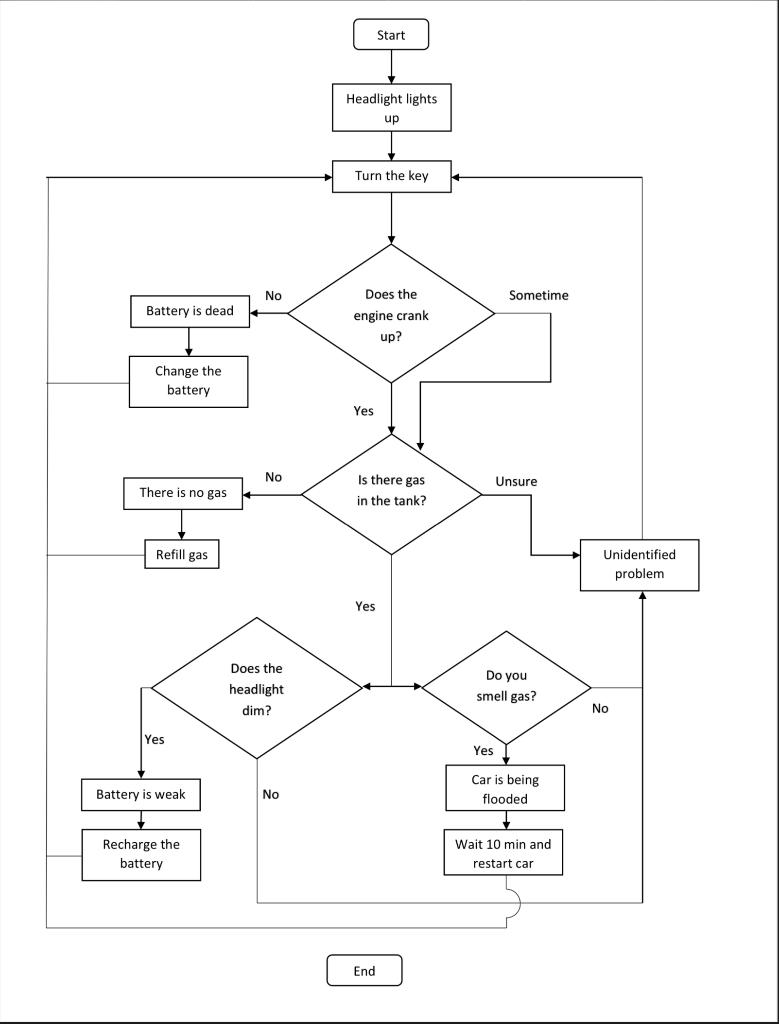
Credit: www.chegg.com
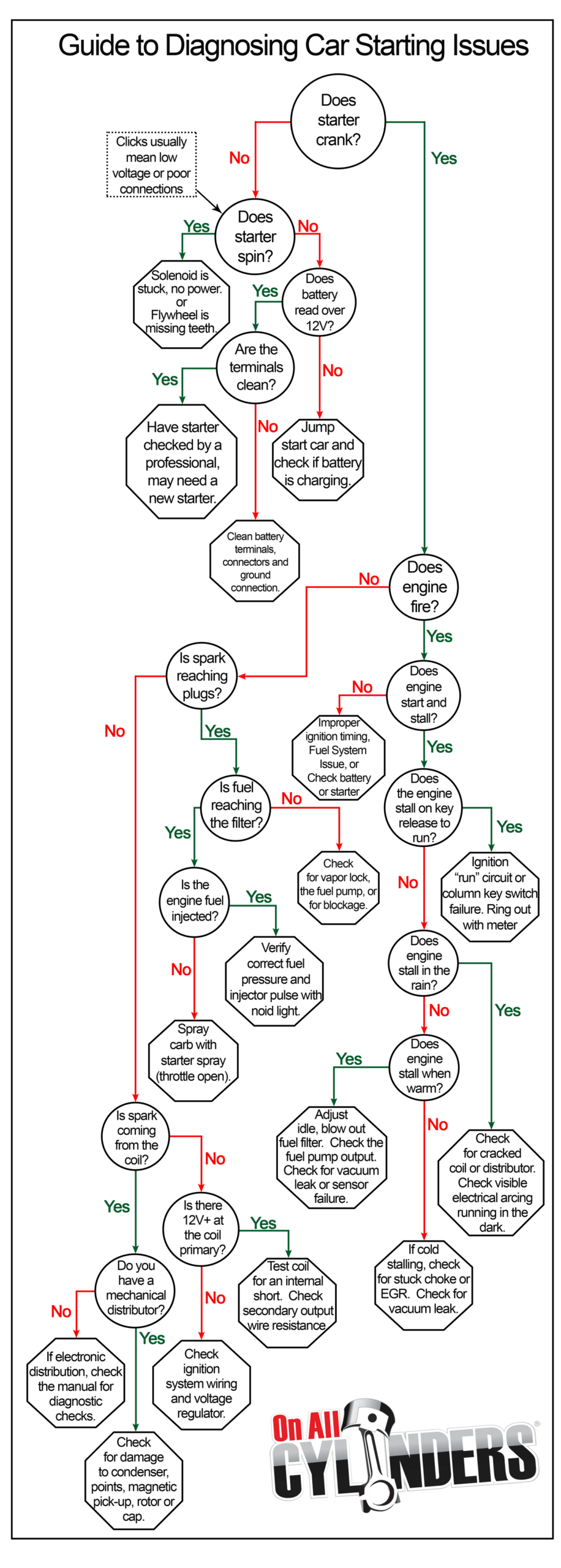
The Car No Start Troubleshooting Flowchart
Let’s break down the logical steps you should follow if your car won’t start. Each step leads you to a possible cause and the next action.
1. Do You Hear Anything When You Turn The Key?
Start by listening carefully. When you turn the key:
- If you hear nothing (no click, no crank), it’s likely an electrical issue.
- If you hear a click but the engine doesn’t turn, the starter or battery may be weak.
- If the engine cranks (makes a spinning sound) but doesn’t start, fuel or spark is likely missing.
Each sound gives a clue about where to look first.
2. Check The Battery
A dead or weak battery is one of the most common reasons a car won’t start. Signs include:
- No lights or very dim dashboard lights.
- Clicking sound, but engine doesn’t turn.
Steps to check the battery:
- Turn on the headlights. Are they bright? If not, the battery may be low.
- Use a multimeter to check voltage. A healthy battery reads about 12.6 volts.
- Try jump-starting the car. If it starts, the battery or charging system is likely the problem.
Pro tip: Even a new battery can fail if terminals are loose or corroded.
3. Inspect Battery Terminals And Cables
Sometimes, the battery is fine but corrosion or loose connections at the terminals stop power from reaching the starter.
- Look for white or blue powdery build-up.
- Wiggle the cables to check if they’re tight.
- Clean terminals with a brush and reconnect.
4. Test The Starter Motor
If the battery is good and connections are clean, listen for a single click or repeated clicks when you turn the key.
- A single click: Starter solenoid may be stuck.
- Rapid clicks: Not enough power reaching the starter.
You can try tapping the starter motor gently with a tool. Sometimes this frees a stuck solenoid. If the engine cranks after tapping, the starter needs repair soon.
5. Check The Ignition Switch And Fuses
A faulty ignition switch or a blown fuse can cut power to the starter system.
- Turn the key to the ‘on’ position. Do dashboard lights come on?
- Check the starter relay and main fuses in the fuse box.
- Replace any blown fuses with new ones of the correct rating.
6. Engine Cranks But Won’t Start
If the engine turns over (cranks) but won’t run, the problem is usually with fuel delivery or ignition.
Fuel System Checks
- Listen for a whirring sound from the fuel pump when the key is turned on. No sound may mean a bad pump or relay.
- Check the fuel gauge. Is there enough fuel?
- Try spraying a little starting fluid into the air intake. If the engine fires briefly, the issue is with fuel delivery.
Ignition System Checks
- Remove a spark plug and inspect it. Is it wet or fouled?
- Hold the plug against metal and crank the engine. Is there a spark?
- No spark means the problem could be with the ignition coil, crank sensor, or engine computer.
7. Check For Engine Immobilizer Or Security Issues
Modern cars have immobilizer systems. If the key or transponder is not recognized, the car won’t start.
- Look for a flashing key or lock symbol on the dashboard.
- Try a spare key if you have one.
- If the security light stays on, the immobilizer may be blocking the start.
8. Other Common Causes
- Neutral safety switch: If your car is automatic, try starting in neutral instead of park.
- Clutch switch: For manual transmissions, press the clutch fully.
- Flooded engine: If you smell fuel, the engine may be flooded. Press the gas pedal to the floor and try starting again.
9. When To Call A Mechanic
If you’ve followed the flowchart and the car still won’t start, it’s time to get professional help. Some problems—like a failed timing belt or a locked engine—need special tools and skills.
Data Table: Common No-start Causes By Symptom
Here’s a quick reference comparing common symptoms and likely causes:
| Symptom | Likely Cause | Action |
|---|---|---|
| No sound, no lights | Dead battery | Check/replace battery |
| Clicking, no crank | Weak battery, bad starter | Jump start, test starter |
| Cranks, won’t start | No fuel, no spark | Check fuel/ignition |
| Security light on | Immobilizer problem | Try spare key, check system |
Credit: www.onallcylinders.com
Real-world Example: Diagnosing A No-start
Let’s look at a real example. A driver tries to start their car. The dashboard lights come on, but when turning the key, there’s just a click. The headlights are dim.
Following the flowchart:
- Battery check: Headlights are dim, so likely a weak battery.
- Jump start: Car starts. The problem is a weak battery or charging system.
- Next step: Check if the alternator is charging the battery when the engine runs.
In this case, the flowchart led quickly to the cause.
Comparison Table: Diy Vs. Professional Diagnostics
Some troubleshooting steps are safe for beginners; others are best for experts. Here’s a comparison:
| Task | DIY Friendly | Needs Mechanic |
|---|---|---|
| Check battery voltage | Yes | No |
| Replace fuses | Yes | No |
| Test starter motor | Maybe | Yes (if removal needed) |
| Diagnose immobilizer | No | Yes |
Credit: www.youtube.com
Two Insights Beginners Often Miss
- Bad connections can mimic dead batteries: Many people replace their battery when the real problem is a dirty or loose terminal. Always check and clean connections first.
- Security systems often cause no-starts: With newer cars, immobilizer faults are common. If you see a flashing key or lock light, try the spare key or consult your manual.
Mistakes To Avoid When Troubleshooting
- Skipping steps: Jumping ahead without checking basics can waste time and money.
- Ignoring warning lights: Modern cars use dashboard lights to signal problems. Always pay attention to these before proceeding.
- Replacing parts without testing: Guesswork often leads to unnecessary costs.
Tips For Success
- Have a basic tool kit: Multimeter, socket set, jumper cables, flashlight.
- Document what you check and the results. This helps if you need a mechanic later.
- Use reliable sources like your car’s owner manual or Haynes repair manuals for model-specific advice.
Frequently Asked Questions
What Is The First Thing To Check If My Car Won’t Start?
The first thing to check is the battery. Make sure it has enough voltage and the terminals are clean and tight. Most no-start issues begin here.
How Can I Tell If My Starter Motor Is Bad?
If you hear a single click or no sound at all when turning the key, and the battery is good, the starter motor or solenoid may be faulty. Tapping the starter sometimes helps temporarily.
My Car Cranks But Doesn’t Start. What Should I Do?
Check for fuel delivery and spark. Listen for the fuel pump, check fuses, and test for spark at the plugs. Lack of either will prevent starting.
Can A Car Security System Stop The Engine From Starting?
Yes, modern immobilizer systems can block the engine from starting if there’s a problem with the key, transponder, or system itself. Look for a warning light on the dashboard.
When Should I Stop Troubleshooting And Call A Mechanic?
If you’ve checked the battery, cables, starter, fuel, and spark and the car still won’t start, or if you’re not comfortable with the next steps, it’s safest to call a professional.
Taking a logical, step-by-step approach with a car no start troubleshooting flowchart can turn a frustrating problem into a manageable process. With patience and the right checks, many no-start issues can be solved at home. If the problem is beyond your tools or skills, don’t hesitate to seek expert help—your safety comes first.