
When your car’s check engine light comes on, it can feel confusing and worrying. Modern vehicles have smart systems to help you find the problem, and OBD2 freeze frame data is one of the most powerful tools available. But what exactly is freeze frame data? How do you read it, and why is it important? This guide will help you understand everything about freeze frame data in OBD2 systems, using simple language and real examples. By the end, you’ll know how to use this information to diagnose and fix car troubles with more confidence.
What Is Obd2 And Freeze Frame Data?
OBD2 stands for On-Board Diagnostics, version 2. It’s a universal system in cars made after 1996, allowing mechanics and drivers to check the health of the engine and other parts. The OBD2 system detects problems, stores trouble codes, and helps repair shops identify faults quickly.
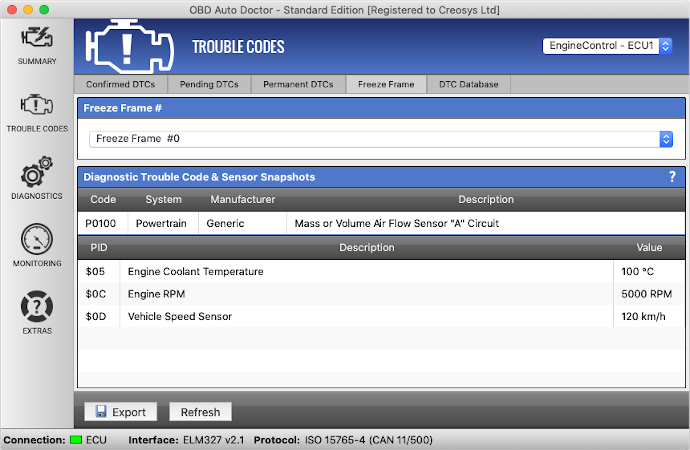
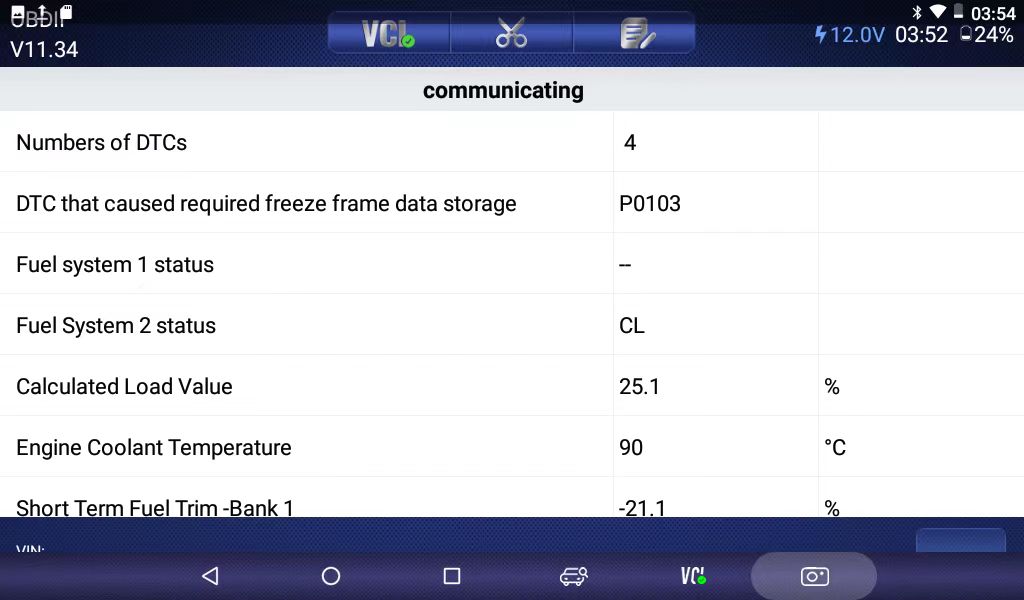
Freeze frame data is a special feature of OBD2. When your car’s computer detects a problem serious enough to turn on the check engine light, it takes a “snapshot” of your engine’s operating conditions at that exact moment. This snapshot is called freeze frame data. It captures details like engine speed, coolant temperature, vehicle speed, and more—just as the fault happened. Think of it as a photograph of your car’s health when something went wrong.
Why Freeze Frame Data Matters
Many beginners ignore freeze frame data, focusing only on the trouble code (like P0420 or P0171). But freeze frame data tells a deeper story. Here’s why it’s so valuable:
- It shows the exact conditions when a problem occurred, making diagnosis faster and more accurate.
- It can reveal if a fault happened during cold start, while idling, or at highway speeds.
- It helps mechanics avoid guessing, saving time and money.
- Some problems only appear under certain conditions. Freeze frame data helps catch these “intermittent” faults.
For example, if you see a code for a lean fuel mixture, freeze frame data can show if it happened when the engine was cold or hot—giving a clue about the cause.
What Information Does Freeze Frame Data Capture?
Freeze frame data includes many parameters. Not every car records all items, but most OBD2 vehicles capture these common values:
| Parameter | What It Tells You | Typical Value Range |
|---|---|---|
| Engine RPM | How fast the engine was running | 0–7000 rpm |
| Vehicle Speed | How fast the car was moving | 0–200 km/h |
| Coolant Temperature | Engine’s heat level | -40 to 215°C |
| Fuel System Status | Open/closed loop state | Open/Closed |
| Short Term Fuel Trim | Instant fuel adjustment | -100% to +100% |
| Long Term Fuel Trim | Ongoing fuel adjustment | -100% to +100% |
| Intake Manifold Pressure | Air pressure in intake | 10–250 kPa |
| Throttle Position | How open the throttle was | 0–100% |
| Intake Air Temperature | Temperature of air going into engine | -40 to 215°C |
| Oxygen Sensor Voltage | Reading from O2 sensors | 0–1V (typical) |
Some vehicles include even more data, such as:
- Engine load
- Barometric pressure
- Timing advance
- Calculated airflow
The more details you have, the easier it is to pinpoint the real problem.
How To Access Freeze Frame Data
You don’t need to be a pro mechanic to check freeze frame data. Here’s how most car owners or technicians can view it:
- Get an OBD2 scanner: Basic code readers show fault codes, but many modern scanners or Bluetooth devices can display freeze frame data.
- Plug the scanner into the OBD2 port: This port is usually under the dashboard, near the driver’s seat.
- Turn the ignition to “ON” (engine off): Some scanners work with the engine running, but most recommend “key on, engine off.”
- Follow the scanner’s menu: Choose the “Read Codes” or “Freeze Frame” option. The display will show details for the most recent code.
Some scan tools also let you save or print the data. This makes it easy to share with a mechanic or track issues over time.
Choosing The Right Obd2 Tool For Freeze Frame Data
There are many OBD2 tools on the market. Not all support freeze frame viewing. Here’s a quick comparison of popular options:
| Type | Features | Price Range | Freeze Frame Support |
|---|---|---|---|
| Basic Code Reader | Reads/clears codes | $20–$50 | Not always |
| Bluetooh Dongle + App | Smartphone display, live data | $30–$100 | Often yes |
| Professional Scan Tool | Advanced diagnostics, prints reports | $100–$1000+ | Always |
Tip: If you plan to check freeze frame data often, look for a tool that advertises this feature. Not all budget readers include it.
Credit: www.obdautodoctor.com
How To Read And Interpret Freeze Frame Data
Seeing the numbers is just the first step. Understanding what they mean is where real value lies.
Step-by-step Freeze Frame Analysis
- Identify the fault code: For example, P0174 (system too lean, bank 2).
- Check freeze frame details: Look at RPM, speed, temperature, fuel trim, etc.
- Compare to normal values: Is the engine cold or hot? Was the car moving or idling?
- Spot unusual values: For example, fuel trim at +25% suggests extra fuel was needed—maybe a vacuum leak.
- Connect the dots: Use all the clues to guess what went wrong.
Example Scenario
Suppose you get a check engine light and code P0302 (misfire cylinder 2). The freeze frame shows:
- RPM: 850
- Vehicle speed: 0 km/h
- Coolant temp: 40°C
- Throttle: 5%
This tells you the misfire happened at idle, with a cold engine. Possible causes include a bad spark plug or injector when starting cold, not a problem at highway speed.
Non-obvious Insights For Beginners
- Freeze frame data may not always match your current problem. Sometimes, the stored snapshot is from an old issue. If you clear codes, new data will be saved only if the fault returns.
- Only the first serious fault stores freeze frame data. If your car gets several codes in one drive, usually only the first fault’s conditions are saved.
Common Mistakes When Using Freeze Frame Data
Even experienced DIYers can make these errors:
- Ignoring freeze frame data: Focusing only on the code, not the conditions.
- Misreading temperature or sensor values: Not realizing that a sensor stuck at a high or low value may itself be faulty.
- Assuming freeze frame data updates for every code: It usually saves only for the first code after a reset.
- Overlooking the impact of environment: Things like outside temperature can affect readings.
Being aware of these mistakes can help you avoid costly misdiagnoses.

Credit: carista.com
Real-world Uses Of Freeze Frame Data
Freeze frame data is not just for car repair shops. Here’s how different people benefit:
- Car owners: Check if a problem is serious before visiting a mechanic.
- DIY mechanics: Save time by narrowing down likely causes.
- Professional technicians: Quickly decide what tests to run next.
- Used car buyers: Spot hidden problems by checking stored freeze frame data and codes.
Some insurance companies and fleet managers also use freeze frame data to understand vehicle use and prevent future breakdowns.
Freeze Frame Data Vs Live Data: What’s The Difference?
It’s easy to confuse freeze frame data with live data. Here’s how they differ:
- Freeze frame data: A one-time snapshot when the fault happened.
- Live data: Real-time information about sensors and engine status as you drive or idle.
You can use live data to watch for problems as they develop, but freeze frame data shows exactly what happened at the moment of trouble.
| Feature | Freeze Frame Data | Live Data |
|---|---|---|
| When Collected | At moment of fault | Continuously |
| Editable? | No | No (view only) |
| Best For | Diagnosing why fault code set | Tracking ongoing performance |
Credit: www.udiagtech.com
Practical Tips For Using Freeze Frame Data
- Always write down freeze frame details before clearing codes. Once cleared, the data is lost.
- Compare freeze frame values to normal specs. You can find normal operating ranges in your vehicle’s service manual or trusted online sources like Wikipedia.
- Don’t be afraid to ask for help. Online forums and communities can help interpret freeze frame data for your specific make and model.
- Check for patterns. If the same fault and freeze frame data returns after repairs, you may have missed the root cause.
Frequently Asked Questions
What Is The Main Purpose Of Freeze Frame Data In Obd2?
Freeze frame data provides a snapshot of engine conditions at the moment a trouble code is set. It helps pinpoint the cause of a problem by showing what the car was doing when the fault happened.
Can I Clear Freeze Frame Data Without Fixing The Problem?
Yes, clearing codes with an OBD2 tool will erase freeze frame data. However, if the problem is not fixed, the check engine light and new freeze frame data will return soon.
Does Every Obd2 Code Store Its Own Freeze Frame Data?
No, usually only the first code that triggers the check engine light gets a freeze frame snapshot. Later codes may not have this data unless the system is reset.
Can I Use Freeze Frame Data To Diagnose Problems Myself?
Yes, many car owners use freeze frame data to understand faults before seeing a mechanic. It’s especially helpful for spotting patterns or ruling out certain causes.
What If My Obd2 Scanner Does Not Show Freeze Frame Data?
Some basic scanners can’t access freeze frame information. Upgrading to a more advanced tool or using a smartphone app with a compatible dongle may solve this.
Understanding OBD2 freeze frame data can save you time, money, and stress when dealing with car problems. By learning to read and interpret this valuable information, you become a smarter, more confident vehicle owner. Whether you’re a DIY beginner or just want to avoid unnecessary repairs, freeze frame data puts you in control of your car’s health.